

About the Accounts page
The Accounts page in Collections provides a comprehensive overview of all the accounts you manage. Review key information such as procedure status and overdue balances at a glance.
Navigation: Select Accounts from the top navigation menu.
- Select the funnel icon to filter the table by column attributes. Select Clear all to remove applied filters.
- Select the Excel icon at the bottom of the table to export the current view as a CSV file.
Aging Balance
This table sorts overdue invoices into one of seven columns depending on their age. Each balance is tagged with one or more coloured dots that represent payment statuses. Use these visualizations in conjunction with filters to priorities your work.
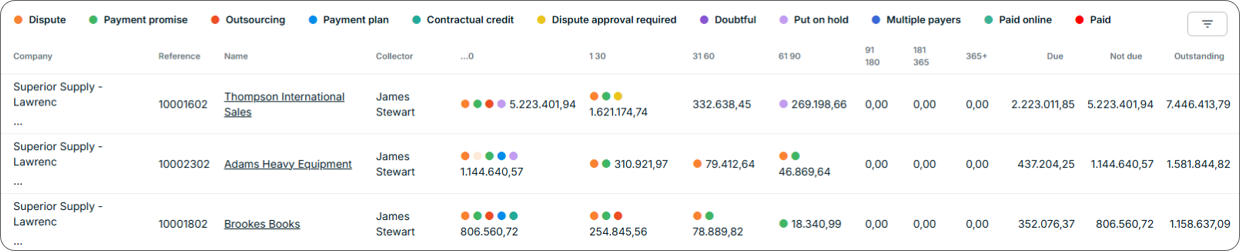
Account Hierarchies
Organise and manage accounts in a parent-child structure, enabling visibility and reporting across related accounts within a unified hierarchy. Use this table to see the hierarchies you have created, the number of accounts within each hierarchy, and the outstanding balance across all accounts.
Accounts with Open Disputes
Review open disputes account by account. See the reason for each dispute, the disputed amount, and the age of the case. Select an account name to open the account record. Select the funnel icon to filter the table by column attributes.
Insured Accounts
Collections integrates with external credit risk service providers, including Atradius, Coface, and Trade Information, to perform credit risk assessments and ongoing monitoring. If your organisation has one of these integrations enabled, you can manage account credit risk directly from Collections. Credit risk data refreshes on a nightly basis.
Related Articles
- About Account Records
- About Document Statuses
- Configure Account Hierarchy
- Add Notes to Account Records and Documents
- Change Document Status
- Create Payment Plans
- Edit Account Records
- Pay Invoices
- View Archived Documents
Need Help?
If accounts are not appearing on the Accounts page, confirm that the most recent import completed successfully. Contact the Billtrust Support team for further assistance.