

How does the LIKE logic work for Onserts?
If using the LIKE operator in Client Connect > Complete Messaging > Onserts, the system will check the entire string of field for the condition.
Example Account Number LIKE 345
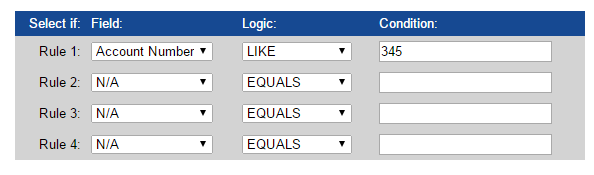
This onsert message will be applied to bills for account AB345, A345B, and 345AB
NOTE: The rules (1-4) are "AND" statements. So, clients should not be using "LIKE" in more than one rule as it will not meet the desired criteria.
Example:
Rule 1 - Account Number - Like - 345
Rule 2 - Account Number - Like - abc
The account number would have to be something like abc345, 345abc, etc. It would need to contain both conditions. account 345 alone or abc alone would not meet the criteria.