

Experian
This guide provides information needed to configure Experian for Credit Application.
Prerequisites
- License: Customers must have their own license for Experian. Billtrust is not acting as a reseller.
- Agency Addendum:If the customer is purchasing their credit reports directly from Experian, we must have an agency addendum in place between Billtrust, the Customer, and Experian that is signed by all parties. A sample can be found here: agency-addendum-3rd-party-agreement.docx for you review. Please request an agency addendum from Phil Ragona. He (or someone in legal) will distribute to the appropriate parties through DocuSign. Phil will require the following information:
- Full legal name of customer
- Physical address of customer
- Name, title and email address of person who will sign for customer
If you customer purchases their Experian Credit Reports from a 3rd Party Reseller (like NACM), an agency addendum may not be required. Your customer should check with their Reseller:
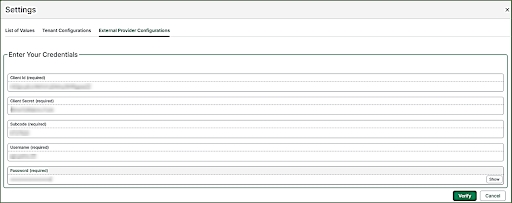
- Credentials: In order to setup Experian in the system, we need the following information from the customer (provided by Experian):
- Consumer Key (ClientID)
- Consumer Secret (Client Secret)
- Subcode
- Username
- Password
- Product Supported: We are currently accessing Premier Profile Data. We do not support any consumer/personal data including the Business Owner Profile including the Business Owner Profile.
- Experian may charge separately for data and credit reports, please talk to you Experian Account Manager about how this may affect you.
Instructions
- Navigate to the External Provider Page in Credit.
- Log in to Credit as an Admin or All Access user.
- Select System Settings and Navigate to View All Settings
- Select External Provider Configuration .
- Select Add New Provider.
- Select Experian Business Information Services from the list of available providers.
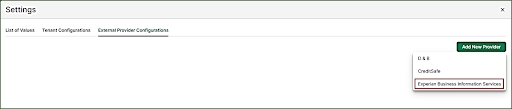
The window to enter your credentials opens.
-
Enter credentials and click verify.
 NOTE
NOTEYou will receive an Invalid Credentials message if your credentials are entered incorrectly or Experian hasn’t activated the license yet.
-
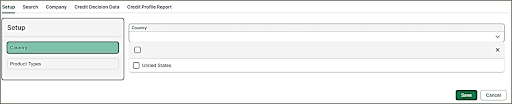
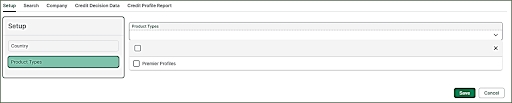
Setup the country and the product.
Country: Only the United State is currently supported.
Product: Only Premier Profile is currently supported.
- Search and Company tabs do not require set up and can be skipped.
- Select Credit Decision Data tab.
- Select system to pull data manually or automatically.
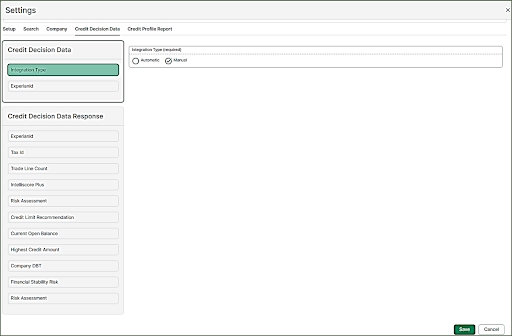
This page also shows the data points that are being retrieved from Experian and displayed in the application.
NOTEIt is recommended to configure for manual data pulls initially to ensure that our customer is being charged by Experian the way they expect to be charged.
-
Select Credit Profile Report tab to configure the report type and report format.
- Select Premier Profile.
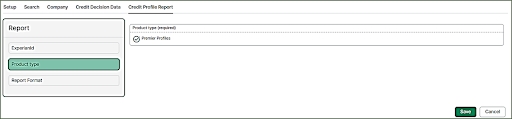
-
Select PDF.
-
Select Save.
Retrieving Data from Experian
Customers set up for automatic credit pulls can retrieve data from the credit app when open.
Customers set up for manual (recommended) credit pulls need to click Get Data.
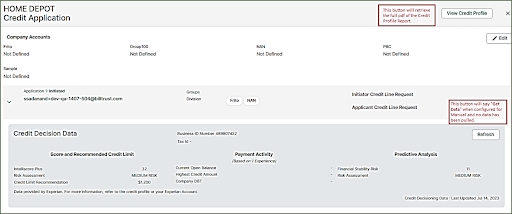
Select View Credit Profile to retrieve a Credit Profile Report from Experian. A new window opens with the report. Both the data and report can be refreshed at any time.
Once the application has been decisioned, the data cannot be refreshed anymore and a pdf version the credit report (at the time of decisioning) is saved to attachments in the customer view of the credit application.
For existing customers that have open applications (Initiated, In Process, In Review):
Only Credit Applications that are initiated after Experian was implemented will automatically have the Experian ID (Business ID Number) available in the application so that credit data and the credit report can be pulled manually or automatically.
For open applications, the credit user will need to manually enter the Experian ID (Business ID Number) into the credit application while reviewing so that they can manually pull credit data and/or reports.