

Use widgets on the Collections dashboard
The Collections dashboard gathers data from your last import in one place. Select General Dashboard to see data from every company in your portfolio, or select a specific company from the left panel to see that company’s data only. The dashboard contains several widgets, each displaying a different KPI.
You can choose which widgets appear on your dashboard and the order they appear. See Edit the Dashboard Layout for instructions.
Account Trade Information
This widget is a direct shortcut to the Trade Information tab on the account sheet. The tab consolidates third-party commercial credit bureau and trade agency data from providers such as Experian, Creditreform, CreditSafe, and Dun & Bradstreet, organised into the following sections:
| Section | What It Shows |
|---|---|
| Company and Legal Information | Legal business name, DBA name, registration numbers (Experian BIN, D&B DUNS, Tax ID/VAT), business type, date of incorporation, phone, email, website, and primary address |
| Credit Risk Scores and Assessments | Bureau scores evaluating financial viability - Experian FSR V2, Intelliscore Plus, Creditreform Solvency Index and Probability of Default, CreditSafe Credit Rating, D&B Paydex Score |
| Credit Limit Recommendations | Third-party recommended credit limits and advisory amounts based on bureau algorithms |
| Trade Payment Behaviour | Current DBT (Days Beyond Terms) and industry benchmark DBT, number of trade and collection accounts, total reported trade balances, open balances, and average payment expectation days |
Aging Balance Chart
This widget visualizes your aging balance as a line chart. Arrears are sorted into segments according to their due date. The length of each segment corresponds to the sum of invoices that fall within that range. Two figures appear above each segment: the balance of arrears in that category and that figure expressed as a percentage of all arrears.
- Arrears are grouped by age, ranging from invoices not yet due to those past due by more than 365 days. Contact the Billtrust Support team to customise these ranges.
- The sum of overdue segments (that is, all invoices except those not yet due) equals the due balance shown in the Collector Progress widget.
- The aging balance equals your outstanding balance, displayed differently.
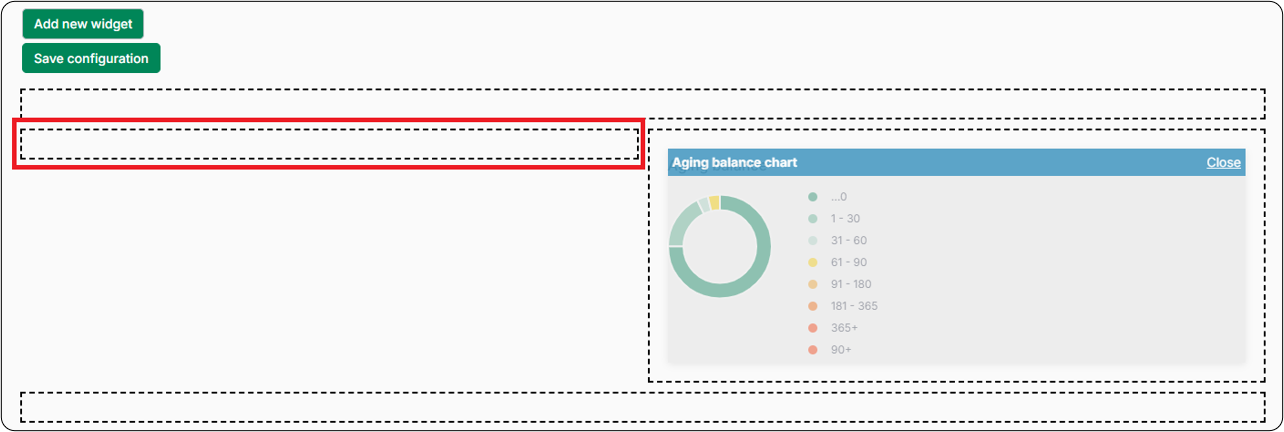
You can also display aging balances as a circle chart. Select Edit page layout → Add new widget → Aging balance chart, then drag the widget to one of the half-width spaces on the layout page.
Average Days Due
Also known as average payment behavior, this widget displays the average number of days that invoices are overdue. Averages are displayed for the last and current weeks. The evolution indicator shows whether overdue invoices are increasing or decreasing over time - green means overdue invoices are decreasing, red means they are increasing.
Collector Actions
This widget shows the total number of actions taken by a collector: the number of emails and letters sent and the number of phone calls made. Select the dropdown to see the number of actions taken today, last week, or last month.
Collector Progress
This widget has two parts: a summary list and a circular progress indicator.
Summary list:
| Item | Description |
|---|---|
| Outstanding balance | The sum of all outstanding invoices in Collections |
| Due | The sum of open invoices past their due date |
| In promise | The sum of open and promised invoices |
| In dispute | The sum of open and disputed invoices |
| In payment plan | The sum of all open invoices on a payment plan |
Tasks indicator: Shows, as a percentage, the workspace actions you have completed - increasing gradually from 0% to 100% as the day progresses.
Collector progress metrics vary by account because different users have different portfolios.
Credit Review Actions
This widget provides controls to manage the credit review lifecycle directly from the account sheet. Available actions depend on your user permissions.
| Action | Description |
|---|---|
| Start Credit Review | Puts the account into active review status. Prompts you to enter a mandatory note stating the reason for the review. |
| Finish Credit Review | Finalizes the active review. Prompts you to enter the newly assigned credit limit and optionally adjust the next review date and frequency. Requires CREDIT_REVIEW_USER permission. |
| Link Existing Credit Application | Links an existing digital credit application created in the Billtrust Credit App to the account’s credit review file. |
| Set / Update Review Date and Frequency | Adjusts the upcoming review schedule and recurring cadence (for example: quarterly, semi-annually, annually) when no review is currently active. |
Credit Review Data
This widget displays the core credit exposure and health metrics for the account.
| Field | Description |
|---|---|
| Credit Limit | The account’s approved credit limit. Authorized credit reviewers can edit this inline while a review is active. |
| Currency | The currency denomination of the credit limit |
| Credit Utilization (%) | The percentage of the allocated credit limit currently in use |
| Total Outstanding | Total open balance across all invoices in Collections |
| Total Due | Total balance of invoices that have passed their due date |
| Reasons for Review / Triggers | The condition that initiated the review - either a manual note or an automated trigger rule (for example: credit utilization above 80%, overdue percentage, payment terms deviation, or bureau score change) |
| Last Review Note | The most recent note recorded by a reviewer during credit evaluation |
Dynamic Report Chart
This widget displays data from your dynamic reports as a chart. After selecting the widget, select Options and use the dropdown to select a chart.
Next Review Date
This widget displays upcoming credit review milestones and functions as a prioritization queue for scheduled credit re-evaluations.
| Field | Description |
|---|---|
| Account Name and Identifier | The account name and debtor reference number |
| Target Review Date | The exact date when the next credit review is scheduled |
| Review Frequency | The configured review interval (for example: every 3 months, 6 months, or 1 year) |
| Automated Trigger Readiness | Tracks accounts nearing their review milestone - when the date is reached, the system automatically transitions the account into active review status |
| Direct Navigation | Click through to the account’s Credit Review workspace tab to conduct or finalise the review |
Payment Evolution and Cash Forecast
This widget shows past payment behavior to forecast how payments are likely to evolve. Using past payment data, Billtrust Autopilot makes an intelligent cash forecast, allowing you to predict inflows and model working capital needs.
- The graph shows data from the past six weeks. Each bar displays the sum of all invoices archived in a given week.
- The date underneath each bar is always the last day of that week.
- Invoices with a negative amount are included in the graph, which can result in a negative total.
Top Bad Accounts
This widget can be configured to show disputes, broken promises, or divergent payment behavior.
| Configuration | Description |
|---|---|
| Disputes | Shows the top 5 accounts with the highest number of disputed invoices. The amount due is the sum the debtor owes regardless of due date. |
| Broken Promises | Shows the top 5 debtors with the highest number of invoices past their promise date. |
| Divergent Payment Behavior | Shows the top 5 debtors with divergent payment behavior in the last 6 months. Divergent payment behavior is calculated as follows: Collections averages the number of days after the issue date of the last 4 paid documents to find the average payment term. If the number of days after the issue date of the leading outstanding invoice is greater than 1.2 times that average, the debtor is classified as having divergent payment behavior. |
User Tasks
This widget shows a table of your outstanding tasks.
Related Articles
Need Help?
If a widget is not appearing on your dashboard, confirm that it has been added via Edit page layout. Contact the Billtrust Support team for further assistance.